
Learn how computer monitoring systems work in 2026 and discover 10 powerful ways they can improve productivity, security, performance, and business operations.
Introduction
Computer monitoring systems help businesses track computer activity, system performance, security events, and resource usage across their digital environments. When used responsibly and with appropriate privacy policies, these systems can help organizations identify technical problems, protect company resources, improve workflows, and understand operational patterns. In 2026, modern monitoring solutions are increasingly using automation, real-time alerts, analytics, and AI-powered insights to make IT management more efficient. Understanding how these systems work can help businesses choose a solution that supports both productivity and security.
In today’s fast-moving digital world, businesses depend heavily on computers to run daily operations. From managing customer data to handling internal communication, almost every task happens through digital systems. This shift has made it essential for organizations to understand how their resources are being used. A computer monitoring system helps companies track, analyze, and improve the way employees interact with technology.
In 2026, computer monitoring systems have become essential for businesses aiming to improve productivity, enhance security, and ensure efficient operations. These systems help track employee activity, monitor system performance, and protect sensitive data from cyber threats. With advanced features like real-time tracking, analytics dashboards, and automated alerts, organizations can gain better control over their digital environment. In this guide, we’ll explore how computer monitoring systems work and how they can support productivity, security, and long-term business growth.
Whether you run a small startup or a large enterprise, having visibility into digital activity can improve efficiency, reduce risks, and help teams stay focused. In this guide, you will learn what a computer monitoring system is, how it works, and why it is becoming a must-have tool for modern businesses.
What is a Computer Monitoring System?
A computer monitoring system is a software solution that tracks and records user activity on computers and networks. It allows businesses to monitor how employees use applications, websites, and system resources during working hours.
This system collects data such as login times, active hours, file usage, browsing behavior, and software activity. The collected data is then analyzed to provide insights into productivity, security risks, and operational efficiency.
The main goal is not just surveillance but improvement. Companies use this data to identify inefficiencies, enhance workflows, and protect sensitive information.
Why Businesses Need a Computer Monitoring System
Organizations today face multiple challenges including remote work management, cybersecurity threats, and productivity tracking. A computer monitoring system helps address these challenges in a structured way.
One of the biggest reasons companies adopt monitoring tools is to improve productivity. When employees know their work is being tracked, they tend to stay more focused. Managers also gain insights into how time is spent, allowing them to optimize workloads.
Another important reason is data security. Businesses handle sensitive information such as customer data, financial records, and proprietary content. Monitoring systems help detect suspicious activity, prevent data leaks, and ensure compliance with regulations.
In addition, companies can reduce operational costs by identifying wasted time, inefficient processes, and unnecessary software usage.
Key Features of a Computer Monitoring System
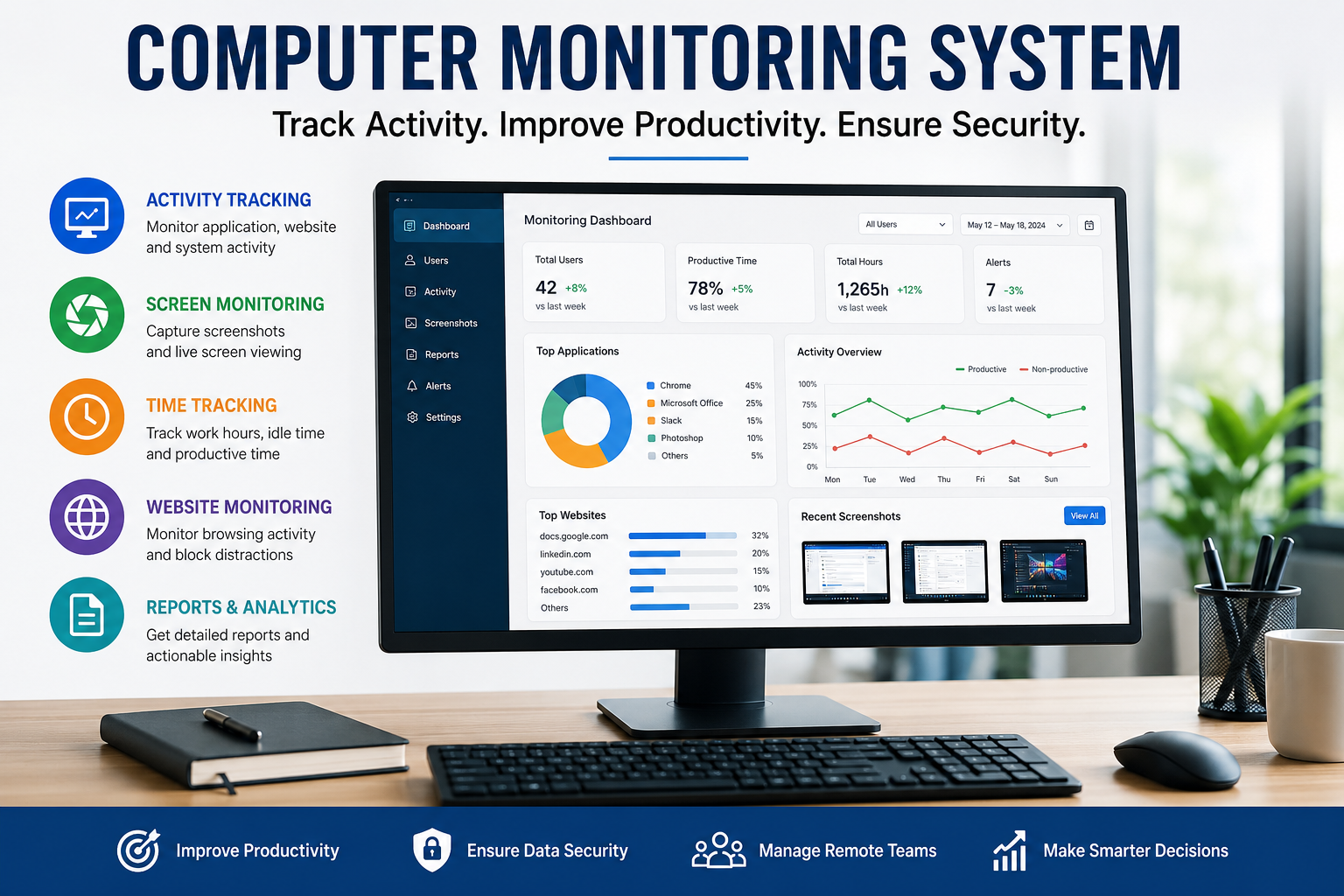
A modern computer monitoring system comes with several advanced features designed to provide detailed insights.
Activity Tracking
Activity tracking records everything from keystrokes to application usage. It shows which tools employees use most and how much time they spend on each task.
Screen Monitoring
Screen monitoring captures screenshots or live screen recordings. This feature helps managers understand how work is being performed in real time.
Time Tracking
Time tracking measures active and idle time. It allows businesses to calculate actual working hours and improve time management strategies.
Website Monitoring
Website monitoring tracks browsing activity. It helps identify non-work-related usage and ensures employees stay focused on tasks.
File Tracking
File tracking records file access, downloads, and transfers. This feature is critical for preventing unauthorized data sharing.
Reporting and Analytics
Advanced reporting tools convert raw data into easy-to-understand insights. These reports help managers make informed decisions.
How a Computer Monitoring System Improves Productivity
Productivity is one of the most significant benefits of using a computer monitoring system. By analyzing employee behavior, businesses can identify patterns that affect performance.
For example, if employees spend too much time on non-work-related websites, managers can implement policies to reduce distractions. Similarly, if certain tasks take longer than expected, workflows can be optimized.
Monitoring also helps in recognizing high-performing employees. This allows companies to reward productivity and encourage a performance-driven culture.
Real-life examples show that companies using monitoring tools often experience a noticeable increase in efficiency within a few months.
Role in Remote Work Management
Remote work has become a standard practice across many industries. While it offers flexibility, it also creates challenges in tracking performance and ensuring accountability.
A computer monitoring system provides visibility into remote operations. Managers can track work hours, monitor progress, and ensure deadlines are met without micromanaging employees.
This transparency builds trust between employers and employees. It ensures that work is being completed while giving employees the freedom to work independently.
Enhancing Data Security and Compliance
Cybersecurity threats are increasing every day. Businesses need to protect their systems from internal and external risks.
A computer monitoring system helps detect unusual behavior such as unauthorized file access or suspicious downloads. It can alert administrators in real time, allowing them to take immediate action.
In industries like finance and healthcare, compliance with data protection regulations is critical. Monitoring systems help maintain logs and records required for audits, ensuring businesses stay compliant.
Computer Monitoring in Marketing and Sales Teams
Marketing and sales teams rely heavily on digital tools. Monitoring systems help track how these tools are used and whether they contribute to results.
For example, in a best account based marketing marketing agency, tracking employee activity can reveal how much time is spent on research, outreach, and campaign management. This insight helps improve strategies and increase return on investment.
By understanding how teams interact with CRM systems, email platforms, and analytics tools, businesses can refine their processes and achieve better results.
Ethical Considerations and Employee Privacy
While computer monitoring systems offer many benefits, they also raise concerns about privacy. It is important for businesses to use these tools responsibly.
Companies should inform employees about monitoring policies and explain how data will be used. Transparency builds trust and reduces resistance.
Instead of using monitoring as a control mechanism, organizations should position it as a tool for improvement and support.
Balancing productivity and privacy is key to successful implementation.
Choosing the Right Computer Monitoring System
Selecting the right system depends on business needs and goals. Companies should consider factors such as ease of use, scalability, and integration with existing tools.
A good monitoring system should provide accurate data without affecting system performance. It should also offer customizable features to match different workflows.
Businesses should look for solutions that offer strong security measures, reliable customer support, and regular updates.
Implementation Best Practices
Implementing a computer monitoring system requires careful planning. Companies should start by defining clear objectives.
It is important to communicate the purpose of monitoring to employees. This helps avoid misunderstandings and ensures smooth adoption.
Training sessions can help employees understand how the system works and how it benefits them.
Regular reviews of monitoring data allow businesses to adjust strategies and improve outcomes over time.
Future Trends in Computer Monitoring Systems
Technology is evolving rapidly, and computer monitoring systems are becoming more advanced.
Artificial intelligence is playing a major role in improving analytics. AI-powered systems can predict behavior patterns, detect anomalies, and provide actionable insights.
Cloud-based monitoring solutions are also gaining popularity. They offer flexibility, scalability, and easy access from anywhere.
As remote work continues to grow, monitoring systems will become even more important in managing distributed teams.
Real-Life Example of Success
Consider a mid-sized company struggling with productivity issues. Employees were missing deadlines, and managers had limited visibility into daily activities.
After implementing a computer monitoring system, the company identified time-wasting habits and inefficient workflows. Within three months, productivity improved by 30 percent.
Managers used data insights to redesign processes and provide targeted training. Employees became more aware of their work habits, leading to better performance.
This example shows how monitoring systems can drive real business results.
Common Misconceptions
Many people believe that computer monitoring systems are only about surveillance. In reality, they are tools for improvement.
Another misconception is that monitoring reduces employee trust. When implemented transparently, it can actually strengthen trust by creating accountability.
Some also think these systems are only for large companies. However, small businesses can benefit just as much by improving efficiency and reducing costs.
Conclusion
A computer monitoring system is more than just a tracking tool. It is a powerful solution that helps businesses improve productivity, enhance security, and optimize operations.
By providing clear insights into digital activity, these systems enable better decision-making and stronger performance. Whether managing remote teams or protecting sensitive data, the benefits are significant.
If you want to take your business to the next level, now is the time to explore a reliable computer monitoring system. Start by identifying your needs, choose the right solution, and implement it with transparency. The results can transform the way your organization works.
FAQs
What is a computer monitoring system used for?
A computer monitoring system is used to track employee activity, improve productivity, and enhance data security within an organization.
Is computer monitoring legal?
Yes, it is legal in most regions as long as employers inform employees and follow local laws regarding privacy and data protection.
Can computer monitoring improve productivity?
Yes, it helps identify inefficiencies, reduce distractions, and optimize workflows, leading to improved productivity.
Does monitoring affect employee trust?
When implemented transparently and ethically, monitoring can build trust by promoting accountability and fairness.
What features should I look for in a monitoring system?
Look for activity tracking, reporting tools, security features, and ease of use to ensure the system meets your business needs.
Is computer monitoring only for large companies?
No, businesses of all sizes can benefit from monitoring systems by improving efficiency and reducing operational costs.
