

Discover how workflow automation saves time, reduces errors, and improves business efficiency with practical examples, tools, benefits, and best practices.
Introduction
Every business has repetitive work. Employees move data between apps, send the same emails, update spreadsheets, create reports, assign tasks, and follow up with customers. These tasks may seem small, but they can take hours every week.
Workflow automation helps businesses handle this work with less manual effort. Instead of asking employees to repeat the same steps, businesses can use software to trigger actions automatically.
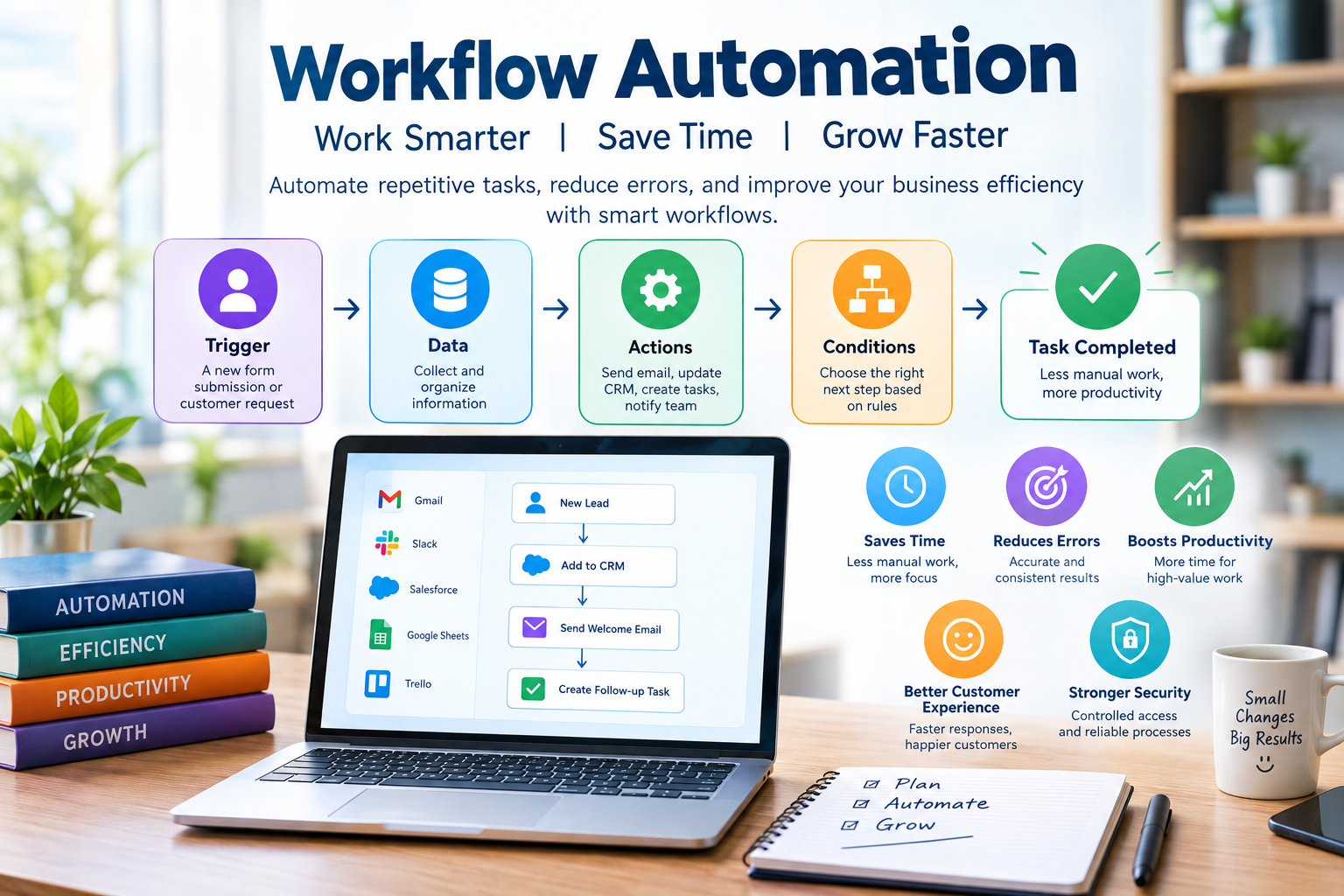
For example, when a customer fills out a contact form, an automated workflow can add the lead to a CRM, send a confirmation email, notify the sales team, and create a follow-up task. No one needs to copy the information from one system to another.
As artificial intelligence, cloud software, and business applications become more connected, workflow automation is becoming easier to use. It is no longer limited to large companies with large IT teams. Small businesses, freelancers, agencies, and startups can also automate many daily processes.
What Is Workflow Automation?
Workflow automation is the use of software to complete repetitive business tasks automatically based on predefined rules, triggers, and actions.
A workflow normally has a starting event followed by one or more actions. The starting event is called a trigger. The actions are the steps that happen after the trigger.
For example, a company may create a workflow where a new website form submission triggers an email notification and creates a new customer record.
The basic idea is simple: when something happens, the system automatically performs the next required steps.
Automation can involve two applications or many different systems. A workflow may connect email, CRM software, spreadsheets, project management platforms, accounting systems, communication tools, and databases.
Modern automation platforms can also use artificial intelligence to classify information, generate responses, summarize documents, and make decisions based on defined conditions.
How Does Workflow Automation Work?
A typical automated workflow has four main elements: a trigger, data, actions, and conditions.
The trigger starts the workflow. It could be a new form submission, a received email, a completed payment, a calendar event, or a new customer record.
The system then receives or retrieves the relevant data. This could include a customer’s name, email address, order number, company name, or purchase amount.
Next, the workflow performs one or more actions. It may send an email, create a task, update a database, notify an employee, or move information into another application.
Conditions can make the workflow more flexible. For example, if a customer spends more than a specific amount, the system could send the lead to a senior sales representative. If the amount is lower, it could follow a standard process.
This allows businesses to create workflows that respond differently depending on the information they receive.
Why Is Workflow Automation Important?
The main reason companies use automation is to reduce repetitive manual work. Employees can spend less time performing routine tasks and more time working on activities that require judgment, creativity, communication, and problem-solving.
Automation can also reduce human error. When employees repeatedly copy information between systems, mistakes can happen. A single wrong email address or incorrect number can create additional problems.
An automated workflow can transfer information consistently every time.
Speed is another major benefit. A person may take several minutes to process a task, while an automated system can often complete it almost immediately.
This matters in areas such as customer service and sales. A fast response can improve the customer experience and prevent leads from being forgotten.
Key Benefits of Workflow Automation
Saves Time
Time savings are one of the clearest benefits of automation.
Consider a company that receives 100 customer inquiries every week. If an employee spends five minutes processing each inquiry, that is more than eight hours of work.
An automated workflow could handle much of the basic processing. The employee can then focus on qualified leads or complex customer questions.
The exact savings depend on the workflow, but repetitive tasks are often strong candidates for automation.
Reduces Human Error
Manual data entry can create errors. Employees can accidentally enter the wrong information, forget a step, or update one system without updating another.
Automation follows the same rules each time.
This does not mean automated systems are always correct. Poorly designed workflows can create large numbers of errors very quickly. That is why testing and monitoring are important.
Improves Productivity
Automation allows employees to focus on higher-value work.
A marketing employee should spend more time planning campaigns and understanding customers than copying contact details between spreadsheets.
A sales representative should focus on conversations and relationships rather than manually creating every follow-up task.
The goal is not simply to make people work faster. It is to remove unnecessary work.
Improves Customer Experience
Customers expect quick responses.
Automation can send confirmation emails, appointment reminders, order notifications, and support messages without requiring an employee to perform each action manually.
For example, after a customer books an appointment, an automated workflow can immediately send confirmation and later send a reminder.
This creates a smoother customer journey.
Makes Processes More Consistent
A documented workflow can make business processes easier to repeat.
When a new employee joins a company, they do not need to remember every small administrative step if the process is already automated.
This can be especially useful for growing businesses where the number of customers and transactions increases quickly.
Common Workflow Automation Examples
Workflow automation can be used in almost every department.
Lead Management Automation
Sales teams often receive leads from websites, social media, advertising campaigns, and other sources.
Without automation, employees may need to manually copy lead information into a CRM.
An automated workflow can capture the lead, create a CRM record, assign the lead to the correct salesperson, and send a notification.
The system can also create a follow-up task.
This reduces the chance that a potential customer will be ignored.
Email Marketing Automation
Email marketing is another common use.
When someone subscribes to a newsletter, automation can add the person to the correct mailing list and send a welcome email.
A business can also create a series of emails based on customer actions.
For example, someone who downloads a guide could receive educational content over several days. If the person clicks a product link, the workflow can update their customer profile.
Customer Support Automation
Support teams handle many repetitive questions.
Automation can categorize incoming requests, assign tickets, send confirmation messages, and notify the correct team.
Simple questions can sometimes be answered automatically, while complex cases can be transferred to a human representative.
This creates a balance between speed and human support.
Invoice and Payment Automation
Finance teams often deal with invoices, payment reminders, and transaction records.
An automated workflow can create an invoice after a completed order, send it to the customer, update payment status, and notify the finance team when an invoice becomes overdue.
This can reduce administrative work and improve financial tracking.
Employee Onboarding
Hiring a new employee often involves many small tasks.
Human resources teams may need to create accounts, send documents, schedule meetings, notify managers, and provide training information.
An automated onboarding workflow can start when a new employee is added to the HR system.
The workflow can then create tasks for different departments and send the required information to the employee.
This makes onboarding more organized.
Content Marketing Automation
Content teams can automate parts of their publishing process.
For example, after an article is approved, a workflow can create a social media task, notify the editor, update a content calendar, and store the final document.
Automation should not replace editorial judgment. It should handle the administrative steps around content creation.
Workflow Automation and Artificial Intelligence
Artificial intelligence is making automation more flexible.
Traditional automation often depends on structured information and clear rules. AI can work with less structured information such as emails, documents, customer messages, and written requests.
For example, an AI-powered workflow can read an incoming email and identify whether it is a sales inquiry, support request, billing question, or general message.
It can then send the information to the correct workflow.
AI can also summarize long messages, extract important details, classify documents, and draft responses.
This creates a powerful combination: automation handles the process while AI helps understand the information inside that process.
AI Workflow Automation Example
Imagine an online company receives customer emails throughout the day.
A traditional workflow may send every email to the same support inbox.
An AI-assisted workflow can analyze each message.
If the email is about a refund, the system can classify it as a billing issue. If it is a technical problem, it can route it to technical support. If it is a sales question, it can notify the sales team.
The system could also create a short summary for the employee.
The human still makes the final decision when needed, but much of the sorting work happens automatically.
Workflow Automation for Small Businesses
Small businesses often assume automation is only for large organizations.
That is not true.
A small business can start with a simple workflow.
For example, a local service provider could automate appointment confirmations and reminders. An online store could automate order notifications. A freelancer could automate client onboarding.
The best starting point is usually a task that is repetitive, predictable, and time-consuming.
Small businesses should avoid automating everything at once. A simple successful workflow is more valuable than a complicated system that nobody understands.
Popular Workflow Automation Tools
Several types of platforms can support workflow automation.
General automation platforms can connect different applications and create trigger-based workflows. CRM platforms often include automation for sales and customer management. Project management software can automate task creation and notifications.
Communication platforms can also support automated alerts.
The right tool depends on the business process.
A company should consider the applications it already uses before selecting an automation platform. Compatibility is important because an automation tool is only useful if it can connect with the systems that hold important business data.
How to Choose a Workflow Automation Tool
Start by defining the problem rather than choosing a tool first.
Write down the current process from beginning to end.
Identify where employees spend the most time. Check which steps are repetitive and which require human judgment.
Then check whether the software you already use provides built-in automation.
If it does not, look for a platform that supports the applications involved in the workflow.
Security should also be considered. Businesses should understand what data is shared between applications and who can access it.
Cost matters too. A low-cost tool may be enough for a small workflow, while larger companies may need advanced permissions, monitoring, and enterprise integrations.
How to Build a Workflow Automation Strategy
Successful automation begins with process analysis.
Choose one process and document how it currently works.
For example, suppose a company processes new leads manually. The team should record how a lead arrives, who receives it, where the data is stored, who follows up, and what happens next.
Then identify unnecessary steps.
The workflow can be redesigned before it is automated.
This is important because automating a bad process does not make it a good process. It simply makes the inefficient process happen faster.
Once the process is clear, select the tools and create the workflow.
Test it with sample data before using it with real customers.
Common Workflow Automation Mistakes
Automating a Bad Process
One of the biggest mistakes is automating a process without reviewing it.
If a workflow contains unnecessary steps, automation will not solve the underlying problem.
Businesses should simplify the process first.
Making Workflows Too Complicated
Complex workflows can be difficult to maintain.
If a simple task can be completed with three steps, there may be no reason to create a workflow with twenty steps.
Start small and add complexity only when it provides real value.
Ignoring Human Oversight
Not every decision should be automated.
Important financial, legal, employment, or customer decisions may require human review.
Automation should support employees rather than remove judgment from processes where judgment matters.
Failing to Monitor Automation
A workflow can work perfectly for months and then fail after an application changes its settings or API.
Businesses should monitor important workflows and create alerts for failures.
Regular testing can also help identify problems before they affect customers.
Workflow Automation and Data Security
Automation often involves customer and business data.
That makes security important.
Businesses should use trusted software, limit permissions, protect account credentials, and avoid sending sensitive information to services without understanding how the information is handled.
Access should be given only to the systems and data required for a specific workflow.
Companies should also review third-party integrations regularly.
A workflow connecting several applications creates several points where data may move. Each connection should be considered as part of the organization’s overall security strategy.
Measuring the Success of Automation
Automation should be measured using real business results.
A company can track how much time employees spend on a task before and after automation.
It can also measure processing time, error rates, response times, customer satisfaction, conversion rates, or operational costs.
For example, if a team spends ten hours every week on manual lead processing and automation reduces that to three hours, the business has a clear productivity improvement.
The goal should not be to automate the largest number of tasks. The goal should be to create meaningful improvements.
The Future of Workflow Automation
Workflow automation is moving toward more intelligent and adaptive systems.
Traditional workflows depend on fixed rules. Newer systems can combine automation with artificial intelligence, natural language processing, machine learning, and AI agents.
This could allow businesses to create workflows using natural language instead of complex technical configurations.
Instead of manually creating every condition, a business user might describe the desired process and use an AI system to help build the workflow.
AI agents may also perform more complex sequences of actions while working within defined permissions.
However, human oversight will remain important. More capable automation can create greater benefits, but it can also create greater risks when mistakes occur.
Is Workflow Automation Worth It?
For many businesses, workflow automation can provide strong value when applied to the right processes.
It can save time, reduce repetitive work, improve consistency, speed up customer responses, and help teams scale.
But automation is not a magic solution.
The best results come from combining good process design, reliable software, clear rules, data security, and human oversight.
A business does not need dozens of automated workflows to see benefits. One well-designed workflow can remove hours of repetitive work every week.
Frequently Asked Questions About Workflow Automation
What is workflow automation in simple words?
Workflow automation means using software to complete repetitive tasks automatically. A specific event starts the workflow, and the system performs the required actions based on predefined rules.
What is an example of workflow automation?
A simple example is a website contact form. When someone submits the form, automation can add the person’s information to a CRM, send a confirmation email, notify the sales team, and create a follow-up task.
What are the benefits of workflow automation?
The main benefits include saving time, reducing manual errors, improving consistency, speeding up processes, and allowing employees to focus on higher-value work.
Is workflow automation only for large businesses?
No. Small businesses and freelancers can also benefit from automation. Simple processes such as appointment reminders, customer onboarding, lead management, email responses, and invoicing can often be automated.
What is the difference between workflow automation and AI automation?
Traditional workflow automation usually follows predefined rules and triggers. AI automation can add capabilities such as understanding text, classifying information, summarizing documents, generating responses, and making decisions based on patterns.
Can workflow automation reduce jobs?
Automation can reduce the need for some repetitive tasks, but it can also allow employees to focus on more valuable work. In many businesses, the main goal is to improve productivity rather than replace entire roles.
How do I start workflow automation?
Start with one repetitive process. Document the current steps, identify unnecessary work, select compatible software, create the workflow, test it carefully, and monitor its performance after launch.
Is workflow automation expensive?
The cost depends on the tools, number of workflows, integrations, and business requirements. Many platforms offer plans for small businesses, while larger organizations may need advanced enterprise features.
Conclusion
Workflow automation is becoming an essential part of modern business operations. It can remove repetitive tasks, reduce errors, speed up processes, and give employees more time to focus on meaningful work.
The most effective approach is not to automate everything. Start with a clear problem and choose a repetitive process that has a measurable cost in time or resources.
Once the workflow is improved, automate it, test it, and monitor the results. Then look for the next opportunity.
As AI becomes more capable, workflow automation will become even more powerful. Businesses that combine automation with strong processes and human judgment can work faster without sacrificing quality.
Start today by identifying one task your team repeats every day. If software can handle that task safely and reliably, turn it into your first automated workflow and build from there.
