

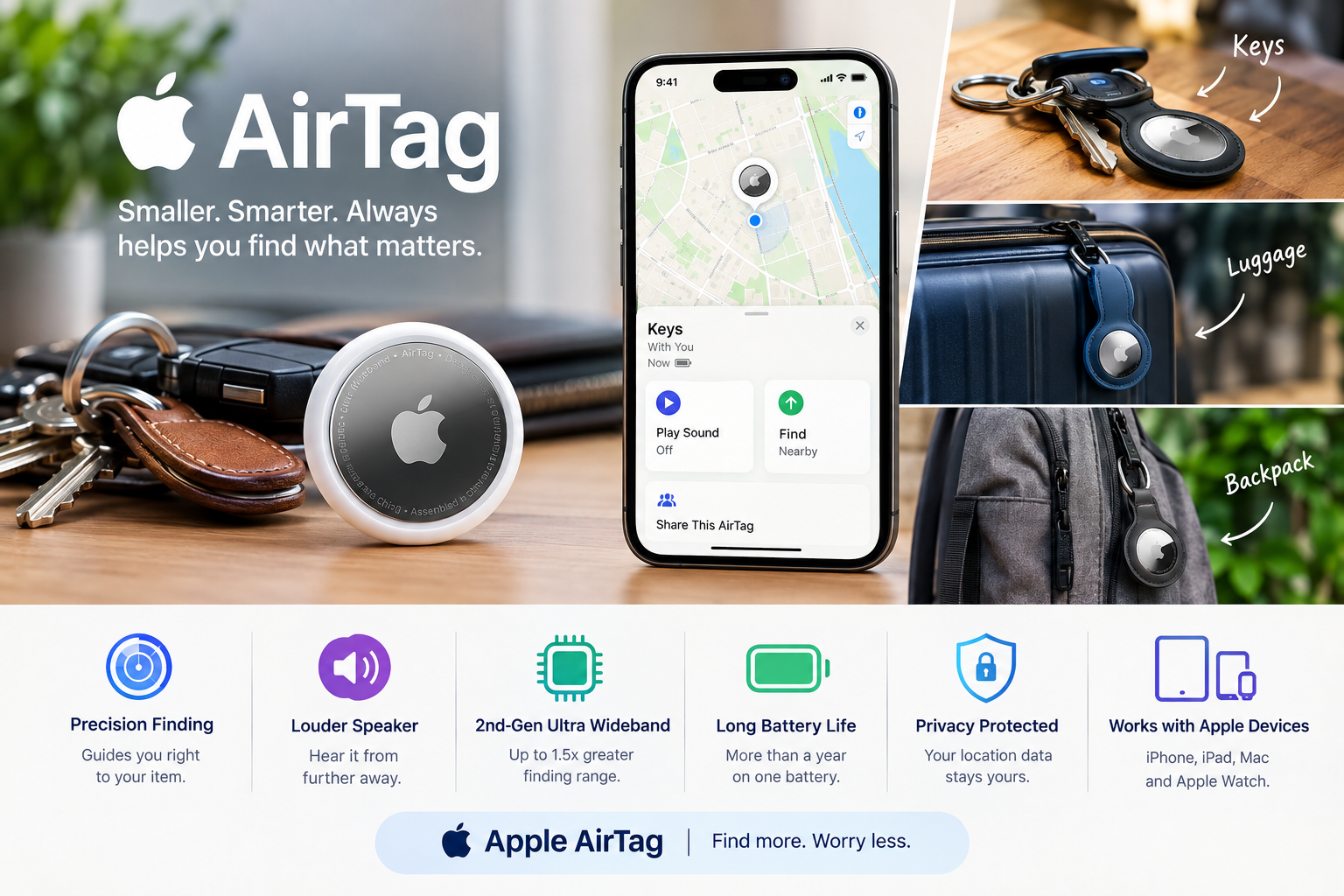
Discover 9 useful Apple AirTag features, including location tracking, Precision Finding, sound alerts, and practical ways to locate everyday belongings.
Losing everyday items such as keys, bags, or luggage can be frustrating, especially when you are in a hurry. Apple AirTag is a small tracking device designed to help users locate personal belongings through Apple’s Find My network and compatible devices. Its features can make it easier to check an item’s location, play a sound, and use supported finding tools when an item is nearby. This guide explores nine useful Apple AirTag features, how they work, and what to know before using one in 2026.
Losing your keys, wallet, backpack, or luggage can turn a simple day into a stressful one. Apple AirTag is designed to make that problem much easier to solve. This small tracking device works with Apple’s Find My network to help you locate personal items, whether they are sitting under a sofa or left behind at an airport.
The latest generation of Apple AirTag makes the idea even more useful. Apple introduced the second-generation AirTag in January 2026 with a longer Bluetooth range, improved Precision Finding, and a louder speaker. Apple says the new model can provide Precision Finding from up to 50 percent farther away than the previous generation, while its speaker is 50 percent louder.
But how does Apple AirTag actually work? How far can it track an item? Does it work without Wi-Fi? How long does the battery last? And is an AirTag useful for luggage, keys, backpacks, or bicycles?
This guide explains everything you need to know about Apple AirTag in simple terms.
What Is Apple AirTag?
Apple AirTag is a small item-tracking device designed to help you find personal belongings. It connects to Apple’s Find My network and can show the location of a tagged item in the Find My app.
The device is small enough to attach to keys, place inside a bag, or use with an accessory on luggage. The second-generation AirTag measures 31.9 millimeters across, is 8 millimeters thick, and weighs 11.8 grams.
AirTag does not have a traditional GPS receiver that constantly sends its own location. Instead, it uses Bluetooth to communicate with nearby Apple devices. Those devices can then securely report the AirTag’s approximate location to the Find My network.
This is one of the main reasons AirTag can be useful even when your lost item is far away.
For example, imagine you leave your suitcase at an airport. Your iPhone may not be directly connected to the AirTag anymore. However, if another compatible Apple device detects the AirTag, its location can be securely relayed to the Find My network.
Apple says the Find My network can use more than a billion Apple devices to help locate items.
How Does Apple AirTag Work?
The technology behind AirTag is simple from a user’s point of view but impressive in practice.
When an AirTag is attached to an item, it sends out a secure Bluetooth signal. Nearby Apple devices can detect that signal and anonymously send the AirTag’s location to iCloud.
You then open the Find My app and view the item’s location on a map.
The process does not require the AirTag itself to have a cellular data connection. Instead, it takes advantage of the large network of Apple devices around the world.
Apple says the communication used by the Find My network is anonymous and encrypted, helping protect user privacy.
This makes AirTag different from many traditional GPS trackers.
A GPS tracker usually needs its own cellular connection or another method of sending location information. AirTag relies heavily on the surrounding Apple ecosystem.
That makes it especially attractive to people who already use an iPhone, iPad, or Apple Watch.
What Is New in the Second-Generation Apple AirTag?
The second-generation AirTag arrived in 2026 with several hardware improvements.
The most important change is improved finding performance.
Apple says the new Apple AirTag uses a second-generation Ultra Wideband chip and provides Precision Finding from up to 1.5 times farther away than the previous generation.
The speaker has also been improved. Apple says it is 50 percent louder than before, and the company says users can hear the new AirTag from up to twice as far away.
These improvements sound small, but they solve common real-world problems.
Think about a set of keys that has fallen behind a piece of furniture. You may know that the keys are somewhere nearby, but finding them visually can still take time.
A louder speaker gives you a better chance of hearing the AirTag.
Likewise, a longer Precision Finding range can make it easier to determine where the item is when you are walking around looking for it.
Precision Finding Makes AirTag More Useful
Precision Finding is one of the most useful features of Apple AirTag.
When the AirTag is nearby and your compatible iPhone supports the required Ultra Wideband technology, the Find My app can guide you toward the tagged object.
Instead of simply showing a map, your iPhone can provide distance and direction information.
You might see that the AirTag is a certain distance away and receive guidance as you move closer.
Your phone can also provide haptic feedback, making the experience easier when you are not looking continuously at the screen.
Apple says the second-generation AirTag provides up to a 1.5x greater Precision Finding range compared with the previous model.
This is especially useful for objects that are nearby but hidden.
For example, your Apple AirTag could be inside a backpack that is buried under clothes. You may already know the general area, but Precision Finding can help narrow the search.
AirTag Can Work With Apple Watch
Another useful improvement in the latest AirTag is Apple Watch support for Precision Finding.
Apple says users can use Precision Finding with Apple Watch Series 9 or later and Apple Watch Ultra 2 or later.
This can be convenient when you are already wearing your watch.
Imagine arriving home after work and realizing you cannot find your keys. Instead of taking out your iPhone immediately, you can use your compatible Apple Watch to help locate the AirTag.
It is a small feature, but it makes the Find My ecosystem more connected.
Apple AirTag and the Find My Network
The Find My network is the real strength behind AirTag.
Bluetooth alone would not make AirTag nearly as useful over long distances. The Find My network expands its usefulness by allowing nearby Apple devices to detect a missing AirTag.
Suppose you accidentally leave your backpack at a café.
Once you walk away, your iPhone may no longer be close enough to communicate directly with the AirTag. But if other Apple devices pass nearby, they may detect the AirTag’s Bluetooth signal.
The location information can then be sent securely to the Find My network.
You can check the Find My app to see where the item was detected.
This makes Apple AirTag particularly useful for travel.
A lost suitcase in a busy airport has a much better chance of being detected than an item sitting alone in an empty field.
Can Apple AirTag Track Luggage?
Yes. Luggage is one of the most practical uses for an AirTag.
Air travel can involve several stages where your suitcase can be separated from you. It may be checked at the airport, moved through a sorting area, loaded onto an aircraft, or sent to another baggage area.
An AirTag can give you an additional way to check the location of your bag.
Apple has highlighted real-world examples of people using AirTag to recover lost luggage. The company has also shared a case involving a musician who used an AirTag inside an instrument case to locate the instrument and perform later that day.
An AirTag does not replace an airline’s baggage tracking system, but it can provide useful extra information.
For frequent travelers, placing an AirTag inside checked luggage can therefore be a simple precaution.
Can You Use AirTag for Keys?
Keys are probably one of the most obvious AirTag use cases.
People often put their keys down without thinking and then spend several minutes searching for them.
With an AirTag attached, you can open Find My and ask Siri to help locate the item.
If the AirTag is close enough, you can play a sound through its built-in speaker.
The new AirTag’s louder speaker makes this even more useful. Apple AirTag says the speaker is 50 percent louder than the previous generation.
A practical setup is to attach the AirTag to a key ring or another suitable holder.
Because the AirTag itself does not have a built-in key-ring hole, an accessory can make attachment easier.
Can AirTag Be Used on a Backpack?
A backpack is another excellent place for an AirTag.
Students can use one to help locate a school bag. Travelers can use one for carry-on luggage. Workers can place one inside a work bag or laptop backpack.
The advantage is that the AirTag does not need to be visible.
You can keep it inside the bag, which reduces the chance of accidentally removing it.
If the backpack is nearby, you can use Precision Finding or play a sound.
If it is farther away, the Find My network may help identify its location when nearby Apple devices detect it.
Can AirTag Track a Bicycle?
AirTag can also be used with bicycles, although the installation method matters.
A person might place an AirTag in a hidden location on a bicycle where it is less noticeable.
This can provide another way to locate the bicycle if it is misplaced or moved.
However, an AirTag should not be treated as a dedicated anti-theft GPS system.
Its tracking method depends on Bluetooth and the Find My network. It does not continuously provide the same type of real-time tracking that a dedicated cellular GPS tracker can provide.
For this reason, AirTag is best viewed as an additional recovery tool rather than a complete bicycle security system.
Apple AirTag Battery Life
Battery life is another reason AirTag is convenient.
The second-generation AirTag uses a user-replaceable CR2032 coin cell battery.
Apple says AirTag can operate for more than a year on a standard battery under typical use.
The exact battery life can vary depending on usage and environmental conditions.
When the battery needs attention, your iPhone can notify you.
Replacing the battery is also much easier than replacing the entire device.
This is useful because an item tracker is something most people want to attach and forget about.
You do not want to charge it every few days like a smartphone.
Is Apple AirTag Waterproof?
AirTag is water and dust resistant, but it is important to use the correct term.
The second-generation AirTag has an IP67 rating under IEC standard 60529. Apple says this means it was tested for immersion in water to a maximum depth of one meter for up to 30 minutes under controlled laboratory conditions.
This does not mean the AirTag is permanently waterproof.
Water resistance can decrease with normal wear.
For everyday use, the rating provides useful protection against situations such as rain, splashes, or accidental exposure to water.
Still, you should not treat Apple AirTag as a device designed for continuous underwater use.
Apple AirTag Privacy and Unwanted Tracking Protection
Privacy is an important part of any tracking technology.
Apple designed AirTag with features intended to reduce unwanted tracking.
An AirTag is designed for tracking objects rather than people.
If an unknown AirTag is moving with someone over time, Apple’s systems can provide unwanted tracking alerts.
This is important because a small tracking device could otherwise be misused.
Apple has invested in features intended to make unwanted tracking harder while still allowing legitimate owners to locate their belongings.
Users should also understand that an AirTag is not a secret personal-tracking tool. Modern Apple devices can provide warnings when an unknown tracker appears to be traveling with someone.
These protections are an important part of the product’s design.
Can You Share an AirTag With Family?
The latest AirTag can also be shared with other people.
Apple says an AirTag can be shared with up to five people.
This can be useful for items that belong to a household rather than one person.
For example, a family car’s keys could have an Apple AirTag attached. Instead of only one person being able to locate the keys, family members can share access.
The same idea can work for a shared bicycle, umbrella, bag, or other household item.
This makes AirTag more useful in families where several people regularly use the same belongings.
Apple AirTag Compatibility
The second-generation AirTag works with Apple’s current ecosystem.
Apple’s technical specifications list an Apple Account, an iPhone running iOS 26 or later, and compatible iPad models as system requirements.
Some advanced finding features have additional hardware requirements.
This is important because not every Apple device provides the same Precision Finding experience.
If you are buying AirTag mainly for Precision Finding, check whether your particular iPhone supports the required Ultra Wideband features.
Apple’s support documentation also notes that environmental factors such as walls and objects between the iPhone and AirTag can affect finding performance.
AirTag vs GPS Tracker
AirTag and GPS trackers can both help locate objects, but they work in different ways.
A dedicated GPS tracker usually determines its location through GPS and sends that information through a cellular or other communications network. It may provide more continuous tracking.
AirTag takes a different approach.
It uses Bluetooth and the Find My network. This can make it small, power efficient, and simple to use, but its location updates depend heavily on nearby Apple devices.
For everyday belongings such as keys, backpacks, wallets, and luggage, AirTag can be a very convenient choice.
For assets that require continuous live tracking, a dedicated GPS tracker may be more appropriate.
The right option depends on what you are trying to track.
Is Apple AirTag Worth It?
For people already using an iPhone, AirTag can be a useful and affordable accessory.
Its value comes from simplicity.
You attach it to an item, connect it to Find My, and then have an extra way to locate that item when it goes missing.
The second-generation model improves the experience with a louder speaker and longer Precision Finding range. Apple introduced it at the same price as its predecessor, with a U.S. price of $29 for one AirTag and $99 for a four-pack at launch.
Whether it is worth buying depends on how often you lose things and what you want to protect.
Someone who regularly loses keys may get daily value from an AirTag.
A person who rarely misplaces anything may not need one.
For frequent travelers, however, an AirTag can provide useful peace of mind inside checked luggage.
How to Get the Most From Apple AirTag
The best way to use an AirTag is to choose items that are both valuable and easy to misplace.
Keys are a natural choice because they are small and frequently moved.
Luggage is another strong option because it can travel long distances without you.
Backpacks, camera bags, musical instrument cases, and other portable items can also benefit.
It is worth checking the battery from time to time, keeping the AirTag securely attached, and making sure your iPhone has the latest software.
You should also understand the limits of the Find My network. A map location is not always the same as a live location.
If an AirTag is in an area with few Apple devices nearby, location updates may be less frequent.
That does not mean the AirTag is broken. It means the network needs a nearby Apple device to detect its Bluetooth signal.
Apple AirTag for Travel
Travelers can get some of the greatest practical value from AirTag.
Airports are busy places, and luggage can sometimes be delayed or misplaced.
An AirTag can help you see whether your bag is still nearby or whether it has been detected somewhere else.
The same principle applies to hotel trips, road travel, and public transportation.
For example, imagine leaving a train and later realizing that your small bag is missing. If the bag contains an AirTag, you can open Find My and check its most recent location.
That information may help you decide whether to return to the station, contact the transport company, or search another location.
The AirTag does not guarantee that you will recover the item, but it gives you more information than you would have without a tracker.
Apple AirTag and the Future of Item Tracking
AirTag shows how everyday objects are becoming connected to digital services.
A small device with Bluetooth, an accelerometer, a speaker, and wireless technology can connect a physical object to a global digital network.
The latest generation also shows how Apple is improving the experience without dramatically changing the basic concept.
The second-generation AirTag keeps the same compact size while adding a second-generation Ultra Wideband chip, improved Precision Finding, and a louder speaker.
That makes the product easier to use without requiring users to learn a completely new system.
As connected devices become more common, item tracking may become a normal part of travel, work, and everyday life.
Frequently Asked Questions About Apple AirTag
What is Apple AirTag used for?
Apple AirTag is used to locate personal belongings such as keys, bags, luggage, backpacks, bicycles, and other items through Apple’s Find My network.
How far can an Apple AirTag track?
AirTag does not have one fixed maximum tracking distance because its long-distance location feature depends on the Find My network. For nearby finding, the second-generation model offers up to 1.5 times the Precision Finding range of the previous generation.
Does AirTag work without Wi-Fi?
Yes. AirTag itself does not need a Wi-Fi connection. It communicates using Bluetooth, while nearby Apple devices can relay its location through the Find My network.
How long does an AirTag battery last?
Apple says AirTag can work for more than a year on a standard replaceable battery under typical use. Battery life can vary depending on usage and other conditions.
Is Apple AirTag waterproof?
AirTag has an IP67 rating for splash, water, and dust resistance. Apple says it can withstand immersion up to one meter for up to 30 minutes under controlled laboratory conditions.
Can AirTag track a person?
AirTag is designed for tracking objects, not people. Apple has also built unwanted-tracking protections into its ecosystem to help alert people when an unknown tracker may be traveling with them.
Can I use AirTag with an Android phone?
AirTag is designed primarily for Apple’s Find My ecosystem and requires compatible Apple devices for its normal setup and tracking features. Android phones can interact with certain NFC and unwanted-tracking functions, but they do not provide the full AirTag experience available on an iPhone.
Can I use AirTag to track luggage?
Yes. Luggage is one of the most useful applications for AirTag. If your luggage is separated from you, the Find My network may help show its location when nearby Apple devices detect the AirTag.
How many people can share an AirTag?
Apple says an AirTag can be shared with up to five people. This is useful for household items or belongings that several family members use.
Is the new Apple AirTag better than the original?
The second-generation AirTag improves the original design with a longer Precision Finding range, a louder speaker, and an updated Ultra Wideband chip. Apple introduced the new model in 2026.
Conclusion
Apple AirTag is a small device, but it solves a very common problem: finding things that disappear at the worst possible time.
The latest second-generation AirTag makes the experience better with a louder speaker, expanded Bluetooth connectivity, and improved Precision Finding. Its integration with Apple’s Find My network also gives it an advantage for people who already use iPhones and other Apple devices.
It is particularly useful for keys, luggage, backpacks, bicycles, instrument cases, and other personal belongings. At the same time, it is important to understand what AirTag is not. It is not a dedicated GPS tracker, and its long-distance location updates depend on Apple’s Find My network.
For most Apple users, the simplicity is the biggest attraction. You do not need to manage a cellular subscription or charge the device every few days. You attach it to an item, connect it to Find My, and have an extra layer of protection when that item goes missing.
If you often lose your keys, travel with valuable luggage, or want a simple way to keep track of everyday belongings, Apple AirTag is worth considering. Check the latest AirTag features and choose the right accessories for the items you want to protect.
