

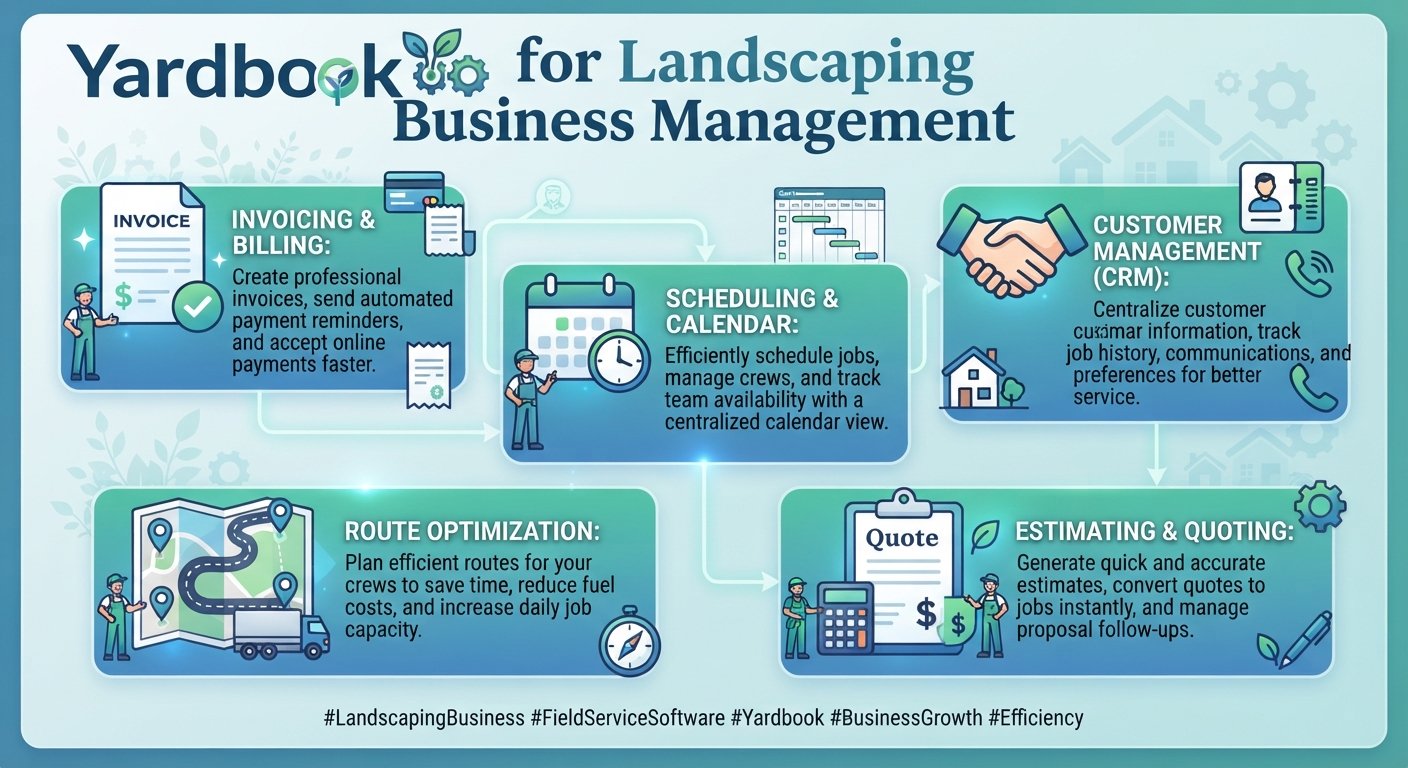
Discover how Yardbook helps landscaping businesses manage customers, estimates, scheduling, routing, invoicing, payments, and daily operations.
Running a landscaping or lawn care business involves much more than mowing lawns and maintaining outdoor spaces. Business owners also need to manage customers, estimates, schedules, crews, routes, invoices, payments, equipment, expenses, and follow-ups. When these tasks are handled with separate spreadsheets, paper records, and messages, daily operations can quickly become difficult to manage.
Yardbook is a business management platform designed specifically for landscaping and lawn care companies. It brings many common business activities into one system, including customer management, job scheduling, estimates, invoicing, routing, expenses, payments, and reporting. Yardbook says more than 20,000 companies use its platform.
One of its most notable features is its free core plan. Yardbook states that businesses can use its main platform at no cost, while optional premium plans provide additional features for companies that need more advanced functionality.
This guide explains what Yardbook is, how it works, its key features, pricing structure, practical uses, benefits, limitations, and what landscaping businesses should consider before adopting it.
What Is Yardbook?
Yardbook is web-based business management software built for landscaping and lawn care companies. It helps businesses manage operational and financial tasks from a central platform.
The software covers several areas of a landscaping business. These include customer relationship management, property records, job scheduling, estimates, invoices, payments, routing, inventory, employee management, expenses, equipment, and reporting.
Instead of using one application for customer records, another for scheduling, a spreadsheet for expenses, and a separate system for invoices, a landscaping business can use Yardbook to bring many of these processes together.
For a small lawn care company, this can make daily administration easier. For a growing landscaping company, features such as route planning, employee access, job profitability, and reporting can provide more structure.
Why Are Landscaping Businesses Using Yard?
Landscaping companies have unique operational needs. A typical business may handle dozens or hundreds of properties, recurring lawn services, seasonal work, crews, equipment, customer requests, and invoices.
Managing all of this manually takes time.
Yardbook is designed around these specific workflows. Its platform includes tools for scheduling jobs, creating routes, measuring properties, managing customers, creating estimates, sending invoices, recording payments, tracking expenses, and managing employees.
For example, a lawn care company may have a customer who receives weekly mowing. Instead of creating a new record every week, the company can manage recurring jobs and use its calendar and scheduling tools to organize service visits.
The platform can also connect property information with services and pricing. This is useful when different properties require different service prices.
Yardbook Features
Customer Management
Customer management is one of the core areas of Yerdbook.
The platform provides a customer view where businesses can store contact information, property details, notes, attachments, customer tags, service history, and other information. Yardbook also supports customer source tracking, filtering, forms, surveys, and lead management.
This can be useful when a landscaping business has a large customer base.
Imagine a lawn care company receives a call from a homeowner who used its service last year. Instead of searching through paper files, the business can use its customer records to find the customer’s property and previous information.
Landscaping businesses can explore the full range of Yardbook features to understand how the platform supports scheduling, estimates, invoicing, routing, and customer management
A centralized customer record can also help employees provide more consistent service.
Property Management
Landscaping businesses often need detailed information about individual properties.
Yardbook supports property records and satellite-based lawn measurement. Businesses can track lawn size, mulch quantities, service dates, property notes, photos, and other information.
This information can support estimating and pricing.
For example, two customers may request the same lawn service, but one property may be much larger. Property-level information helps businesses account for these differences rather than applying the same price to every customer.
Job Scheduling
Scheduling is essential for lawn care and landscaping companies.
Yardbook provides calendar-based scheduling for one-time and recurring jobs. Businesses can view activities by day, week, or month, assign jobs to employees or crews, change schedules, manage job status, and create routes.
This can be especially useful during busy seasons.
Suppose a company has 60 mowing customers scheduled across a week. A centralized calendar can help the manager see where each service visit belongs and assign work to the appropriate crew.
Route Planning and Optimization
Driving between properties is a major part of many landscaping businesses. Poor routing can increase travel time, fuel costs, and employee workload.
Yerdbook includes route creation, map-based dispatch, route assignment, geocoding, and route optimization features. Its documentation states that the system can help optimize routes based on shorter distances.
The platform also supports route templates and additional routing features for different workflows.
For a company with many daily service visits, better route organization can make field operations more predictable.
Estimates
Creating accurate estimates is important for winning landscaping jobs while protecting profit margins.
Yardbook allows businesses to create estimates, include optional services, capture customer approvals and signatures, add products from a catalog, and generate invoices from estimates.
A landscaping company could create an estimate for lawn installation that includes soil preparation, grass seed, labor, materials, and follow-up maintenance.
The customer can review the estimate, while the business can use the approved information as part of the job workflow.
Invoicing
Yardbook provides invoicing features that allow businesses to generate and send invoices. It also supports batch invoicing, invoice templates, company logos, QR codes, and direct invoicing from jobs.
This can reduce manual billing work.
For example, when a recurring service is completed, the business can use its job and billing workflow to create the related invoice rather than rebuilding the same information from scratch.
Online Payments
Getting paid on time is important for cash flow.
Yardbook supports payment records and online credit card payments through Stripe. Its features include payment links, self-service customer payments, payment confirmations, partial payments, and other payment-related options.
Customers can receive an invoice with a payment option, which can make the payment process more convenient.
Businesses should still review applicable payment processing costs and terms before choosing how they want to accept payments.
Expense Management
Landscaping companies have many expenses, including fuel, materials, equipment, repairs, employee costs, and vendor purchases.
Yardbook allows businesses to track expenses by category and store vendor information, payment methods, check numbers, and attachments. It also provides financial reporting options.
This can help owners understand where business money is being spent.
For example, a company may discover that equipment maintenance costs are rising. Reviewing expense data can help management investigate the cause.
Equipment Management
Equipment is a major investment for landscaping companies.
Mowers, trimmers, blowers, trailers, vehicles, and other equipment need regular maintenance.
Yardbook includes equipment records, maintenance scheduling, storage location tracking, purchase information, serial numbers, and model details.
A business can use these records to create a more organized equipment maintenance process.
Employee and Crew Management
As a landscaping company grows, it may employ several crews.
Yardbook supports employee records, crew management, job assignment, employee access controls, and limited access for field workers.
This allows managers to control what different employees can access.
A field employee may only need to see the day’s assigned jobs, while an owner may need access to financial reports and customer information.
Time Tracking
Time tracking can help businesses understand how long employees spend on jobs.
Yardbook provides a time clock and manual timesheet options. It also supports approvals, audit trails, analytics, exports, and timesheet-based billing.
This can be useful for companies that want to compare labor time with job revenue.
Yardbook Pricing in 2026
Yardbook’s pricing structure is one of the reasons the platform may attract small landscaping businesses.
According to Yardbook’s current pricing page, the Starter plan is free and includes customer management, jobs and scheduling, estimates, invoices, routing, expenses, reports, lot measurement, employee access, credit card payments, snow removal, and a product catalog.
The Business plan is listed at $34.99 per month and adds features such as bulk emails, bulk text messages through Twilio integration, GPS tracking, automatic backups, automatic invoice reminders, customized lead capture, and a multi-step chemical program.
The Enterprise plan is listed at $49.99 per month and adds features including QuickBooks synchronization and a branded company portal.
Yardbook states that all plans include web and desktop access along with Android mobile app access.
Pricing can change, so businesses should check the official pricing page before making a purchasing decision.
Is Yardbook Really Free?
Yes, Yardbook offers a free plan.
The company explains that its free model is supported by a sponsored advertising business model and that optional premium features are available for businesses that need more advanced functionality.
This makes Yardbook different from software that requires every business to start with a paid subscription.
For a new lawn care business with a limited budget, the free plan can provide an opportunity to organize basic operations without adding another monthly software expense.
However, companies should compare their needs with the limits and features of each plan.
Yardbook for Small Landscaping Businesses
Small landscaping companies often have limited staff and budgets.
An owner may handle sales, scheduling, estimates, customer communication, billing, and field work at the same time. Using separate systems for each activity can create unnecessary administrative work.
Yardbook can provide a central system for these functions.
Consider a new lawn care company with one owner and two employees. The owner receives customer inquiries, schedules weekly mowing, sends estimates, tracks expenses, and collects payments.
Instead of maintaining separate spreadsheets for each process, the owner can organize many of these activities inside one platform.
As the company grows, the business can consider whether premium features such as GPS tracking, automated reminders, or additional integrations are worth the added cost.
Yardbook for Growing Landscaping Companies
Growing businesses usually face more complexity.
A company may move from a few dozen customers to hundreds. It may add crews, vehicles, recurring contracts, seasonal services, and multiple service areas.
At this stage, scheduling and routing become more important.
Yardbook’s job assignment, route planning, employee access, time tracking, equipment management, and reporting features can help create more organized operations.
The business should still review its workflow regularly. Software can support growth, but good processes and trained employees remain important.
Yardbook for Lawn Care Scheduling
Recurring lawn care services are a strong use case for scheduling software.
A business may offer weekly mowing, biweekly maintenance, seasonal fertilization, weed control, or snow removal.
Yardbook supports recurring jobs and service calendars. Businesses can also manage service-based scheduling and route assignments.
For example, a company can organize recurring mowing customers by service day and route. When weather or another issue forces a change, the schedule can be adjusted instead of relying on handwritten notes.
This can make seasonal workload management easier.
Yardbook and Property-Based Pricing
Pricing can be difficult when each property is different.
Yardbook offers property-based pricing, which allows businesses to set different prices for services at different properties. Its documentation also describes pricing options based on property measurements.
Yardbook also has a matrix pricing feature that can calculate prices based on attributes such as property or lawn size. The company’s documentation currently describes this feature as being in beta.
This type of pricing can be useful for lawn care companies that charge based on property size.
For example, a business may charge different mowing prices for properties with 1,000 square feet, 2,000 square feet, and 4,000 square feet of lawn.
Yardbook for Chemical Tracking
Businesses that provide lawn treatment services may need to track chemical applications.
Yardbook includes chemical tracking features that can record application details, chemical products, applicators, customer instructions, and related records. The platform can also generate chemical reports.
This can help companies keep more organized service records.
Businesses should still follow all applicable local, state, and federal rules regarding chemical use, storage, licensing, and reporting.
Yardbook and Automation
Automation can reduce repetitive administrative work.
Yardbook supports integrations with Zapier, and its feature documentation lists triggers for events such as new leads, new prospects, approved estimates, new customers, completed jobs, surveys, and to-do items.
For example, a business could connect a new lead workflow to another application so that certain information is automatically transferred.
Automation should be introduced carefully. Before automating a process, businesses should make sure the underlying workflow is already clear and reliable.
Yardbook Reporting and Business Insights
Good business management requires more than completing jobs. Owners also need to understand profitability and performance.
Yardbook includes reports covering payments, expenses, invoices, sales tax, earnings forecasts, mileage, job costing, profitability, employee revenue, and other business data.
These reports can help owners answer practical questions.
Which services generate the most revenue? Which jobs have high costs? How much mileage is being used? Are certain customers or service types more profitable?
For example, a landscaping company may discover that a service generates strong revenue but requires unusually high labor hours. Management can then review pricing or workflow.
A Real-World Yardbook Workflow Example
Imagine a landscaping company receives a request from a homeowner for weekly lawn care.
The company creates the customer record and adds the property. The property information can include measurements, photos, notes, and service details.
The business then prepares an estimate. After the customer approves it, the company can create the related job.
The manager schedules recurring visits and assigns them to a crew. Jobs can be organized into routes so employees spend less time traveling between properties.
After the crew completes the work, the business can create an invoice and allow the customer to make an online payment.
The owner can later review revenue, expenses, employee time, and job profitability.
This example shows how Yardbook can connect sales, operations, field service, and financial workflows.
Advantages and Considerations of Yardbook
Yardbook has several features that may appeal to landscaping businesses. Its industry-specific design means that many tools are built around lawn care and landscaping workflows rather than generic project management.
The free Starter plan can also be attractive to new businesses with limited budgets.
The platform provides a broad feature set, including customer management, scheduling, estimates, invoicing, routing, payments, equipment, expenses, and reporting.
However, businesses should still evaluate the platform based on their own needs. A company with complex accounting, specialized integrations, or advanced enterprise requirements may need additional software or services.
The best approach is to test the platform using real business scenarios before moving all operations into it.
How to Get Started With Yardbook
The easiest way to evaluate Yardbook is to begin with the basic workflow of your business.
Create a few customer records, add properties, create sample services, build an estimate, schedule a job, and test the invoicing process.
If your business has employees, test employee permissions and mobile workflows as well.
Next, review your reporting needs. Make sure the reports provide the information you need for daily management and financial decisions.
Finally, compare your experience with the features and pricing of other landscaping business software. The right platform should fit your business rather than forcing your business into an unnecessarily complicated process.
Frequently Asked Questions
What is Yardbook used for?
Yardbook is used to manage landscaping and lawn care businesses. It provides tools for customer management, property records, job scheduling, estimates, invoices, payments, routing, expenses, employees, equipment, and reporting.
Is Yardbook free?
Yardbook offers a free Starter plan. The company also provides paid plans with additional features for businesses that need more advanced functionality.
How much does Yardbook cost?
Yardbook’s current pricing page lists a free Starter plan, a Business plan at $34.99 per month, and an Enterprise plan at $49.99 per month. Pricing and plan features can change, so businesses should verify current details directly with Yardbook.
Does Yardbook have a mobile app?
Yardbook states that its plans include web and desktop access and Android mobile app access.
Can Yardbook create invoices?
Yes. Yardbook supports invoices, batch invoicing, invoice templates, payment records, and online payment options.
Can Yardbook schedule lawn care jobs?
Yes. Yardbook supports one-time and recurring jobs, calendar scheduling, job assignments, route-based assignments, and other scheduling functions.
Does Yardbook support route optimization?
Yes. Yardbook provides route creation and optimization features and can organize jobs based on geographic locations and routes.
Can Yardbook track employees?
Yes. Yardbook includes employee records, crew management, job assignments, employee access controls, and time tracking features.
Does Yardbook integrate with QuickBooks?
QuickBooks synchronization is listed as an Enterprise feature on Yardbook’s current pricing page.
Who should use Yardbook?
Yardbook is primarily designed for landscaping and lawn care businesses. It can be useful for companies that need to manage customers, properties, recurring jobs, estimates, scheduling, routing, invoices, payments, expenses, and field employees in one platform.
Conclusion
Yardbook is a specialized business management platform built around the daily needs of landscaping and lawn care companies. It combines customer management, property records, scheduling, routing, estimates, invoicing, payments, expenses, employee management, equipment tracking, and reporting in one system.
Its free Starter plan can make it particularly accessible for small businesses and new lawn care companies, while paid plans provide additional features for businesses with more advanced operational needs.
The most important question is not simply whether Yardbook has many features. It is whether those features match the way your landscaping business operates.
If you are currently managing customers, jobs, estimates, routes, and invoices through separate spreadsheets or manual processes, testing Yardbook with a small part of your workflow can help you understand whether it is a good fit.
Start with your core tasks, organize a few real customers and jobs, test scheduling and billing, and review the available reports. A structured software system can help reduce administrative work and give landscaping business owners more time to focus on customers, crews, and growth.
