

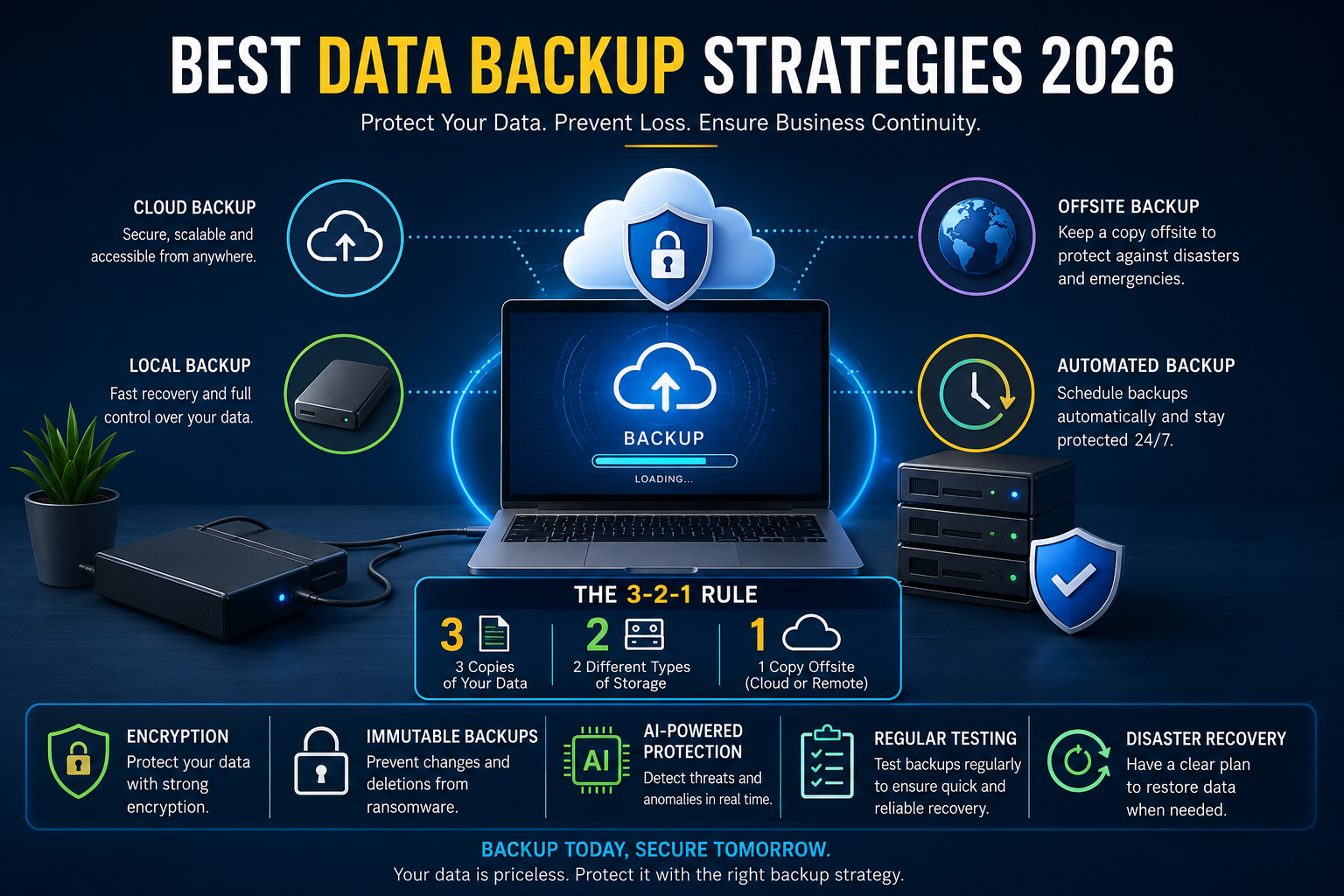
Explore the best data backup strategies 2026 to protect files and business data from loss, cyber threats, and system failures.
Best Data Backup Strategies 2026
Data has become one of the most valuable assets in the digital world. From personal photos and financial records to business files and customer databases, losing important information can create serious problems. In 2026, cyberattacks, ransomware, hardware failures, and accidental deletions are more common than ever. That is why strong backup planning is no longer optional.
In 2026, protecting your data is more important than ever as cyber threats, system failures, and accidental data loss continue to rise. Whether you’re an individual or a business owner, having a reliable backup strategy ensures your important files remain safe and recoverable. From cloud storage to automated backups and secure systems, the right approach can prevent costly data loss. In this guide, we’ll explore the best data backup strategies 2026 to help you protect your files and business data effectively.
Many people think saving files on a single device is enough. Unfortunately, laptops crash, phones get stolen, and cloud accounts can be hacked. A modern backup strategy protects your data from every possible risk while making recovery simple and fast.
This guide explains the best data backup strategies 2026 businesses and individuals should use. You will learn practical methods, modern storage solutions, and expert tips that help keep your information safe in the long term.
Why Data Backup Matters More in 2026
Technology is growing rapidly, but so are digital threats. Companies now rely heavily on cloud systems, remote work, and online collaboration tools. Personal users also store thousands of files across devices.
Recent cybersecurity reports show ransomware attacks continue to rise globally. Hackers often target weak backup systems because they know businesses depend on quick access to data. Even small companies are becoming targets.
At the same time, hardware failures still happen regularly. Solid-state drives may be faster, but they can fail without warning. Mobile devices are also vulnerable to damage, theft, and accidental resets.
A reliable backup strategy helps you:
Protect critical information
Recover files quickly after an attack
Avoid expensive downtime
Maintain business continuity
Reduce stress during emergencies
Keep personal memories safe
Without backups, recovering lost information can become impossible.
Understanding the 3-2-1 Backup Rule
The 3-2-1 rule remains one of the most trusted best data backup strategies 2026.
The idea is simple:
Keep 3 copies of your data
Store backups on 2 different types of storage
Keep 1 backup copy offsite
For example, you may store your original files on a laptop, save another copy on an external hard drive, and upload a third version to cloud storage.
This approach reduces the risk of complete data loss because one problem cannot destroy every copy at the same time.
Businesses still rely heavily on the 3-2-1 method because it balances security, affordability, and flexibility.
Cloud Backup Solutions Are Dominating 2026
Cloud backup services continue to grow because they are simple, scalable, and accessible from anywhere.
Modern cloud platforms automatically sync files in real time. This means your latest documents remain protected even if your device suddenly fails.
Popular cloud storage platforms now offer advanced encryption, AI-based threat detection, and ransomware recovery options.
Some major advantages include:
Automatic backups
Remote access from multiple devices
Fast disaster recovery
Reduced hardware dependency
Easy file sharing
Scalable storage capacity
Cloud backups work especially well for remote teams and freelancers who work across different locations.
However, cloud-only storage is not always enough. Many cybersecurity experts recommend combining cloud backups with offline storage for maximum protection.
Local Backups Still Play a Critical Role
While cloud technology is growing fast, local backups remain extremely important.
External hard drives, network-attached storage devices, and USB backups provide direct control over your information. They also allow fast recovery without depending on internet speed.
Local backups are useful because they:
Provide quick file restoration
Work without internet access
Offer lower long-term costs
Keep sensitive data under your control
Many photographers, video editors, and businesses with large files still prefer local storage because uploading terabytes of information to the cloud can take time.
In 2026, hybrid backup systems are becoming the standard solution. These systems combine local and cloud storage together for stronger protection.
Hybrid Backup Strategies Offer Maximum Protection
A hybrid best data backup strategies 2026 combines cloud backups with local backups.
This method gives users the speed of local storage and the security of offsite cloud protection.
For example:
A company may store daily backups on a local NAS device while also syncing encrypted copies to a secure cloud provider.
If ransomware attacks the local network, the cloud backup remains safe. If internet service fails, the local backup still provides fast access.
Hybrid systems are considered one of the best data backup strategies 2026 because they improve both reliability and recovery speed.
Large organizations, startups, and even home users are increasingly adopting hybrid systems due to their flexibility.
Immutable Backups Are Becoming Essential
Immutable backups are one of the biggest trends in data protection for best data backup strategies 2026.
An immutable backup cannot be changed, deleted, or encrypted once it is created. This feature is especially important against ransomware attacks.
Cybercriminals often attempt to destroy best data backup strategies 2026 before demanding payment. Immutable storage prevents unauthorized modifications.
Many cloud providers now offer immutable backup options that lock files for a specific period.
Benefits include:
Strong ransomware protection
Improved compliance security
Safer disaster recovery
Reduced risk of accidental deletion
Financial institutions, healthcare companies, and enterprise businesses now use immutable backups as part of their cybersecurity strategies.
AI-Powered Backup Systems Are Changing the Industry
Artificial intelligence is transforming best data backup strategies 2026.
Modern backup software uses AI to monitor storage behavior, detect unusual activity, and automate protection processes.
AI-powered systems can:
Identify suspicious ransomware patterns
Optimize storage usage
Predict hardware failures
Prioritize important files
Automate backup schedules
This technology reduces human error and improves recovery efficiency.
For example, some AI systems now detect unusual encryption activity and automatically isolate best data backup strategies 2026 before malware spreads further.
Businesses using intelligent backup automation can recover faster during emergencies while reducing operational risks.
The Importance of Encryption in Backup Security
Backing up files is not enough if the data itself is not secure.
Encryption protects your information by converting it into unreadable code that only authorized users can access.
In best data backup strategies 2026, strong encryption is considered a basic requirement for any reliable backup system.
End-to-end encryption is especially important for:
Financial records
Medical information
Business contracts
Customer databases
Personal identity documents
Many cloud storage providers now include advanced encryption features by default. Still, users should always verify security settings carefully.
Strong passwords and multi-factor authentication also add extra protection against unauthorized access.
Air-Gapped Backups Provide Extra Safety
Air-gapped backups are completely disconnected from networks and internet connections.
This makes them highly resistant to cyberattacks.
An air-gapped backup may involve:
Offline hard drives
Tape storage systems
Disconnected backup servers
Since hackers cannot access disconnected devices remotely, air-gapped backups are considered one of the safest recovery methods available.
Large enterprises often use air-gapped storage for critical data protection.
Although managing offline storage requires extra effort, the added security can be extremely valuable during major cyber incidents.
Automated Backups Reduce Human Error
One of the biggest causes of data loss is simple human forgetfulness.
People often delay backups until it becomes too late.
Automated backup systems solve this problem by scheduling regular backups without manual effort.
Automation ensures:
Files stay updated consistently
Critical data is never skipped
Recovery points remain current
Backup tasks happen even during busy periods
In 2026, most professional backup tools allow customizable scheduling with real-time synchronization features.
Automatic systems are especially useful for small businesses that may not have dedicated IT teams.
Best data backup strategies 2026
Choosing the right storage solution is critical for long-term data protection.
External SSDs
External SSDs are faster, smaller, and more durable than traditional hard drives. They work well for personal backups and portable storage.
Network Attached Storage
NAS systems allow multiple devices to back up data on a centralized local network. These systems are popular among businesses and advanced home users.
Cloud Storage Platforms
Cloud providers offer flexible storage with remote access and automated syncing features.
Tape Backup Systems
Although older, tape storage remains popular for enterprise-level archival storage because of its reliability and low long-term cost.
Cold Storage Solutions
Cold storage keeps rarely used data offline for maximum security and long-term preservation.
Each option has different strengths depending on budget, storage size, and recovery needs.
Data Backup Strategies for Small Businesses
Small businesses often underestimate backup risks until a disaster happens.
A single ransomware attack can shut down operations for days or even weeks.
The best data backup strategies 2026 for small businesses focus on affordability, automation, and quick recovery.
Small companies should:
Use hybrid backup systems
Enable automatic daily backups
Store encrypted offsite copies
Test recovery systems regularly
Limit employee access permissions
Even simple backup plans can significantly reduce financial damage after a cyberattack or hardware failure.
Personal Data Backup Tips for Families and Individuals
Personal users also face increasing risks.
Smartphones now contain photos, banking apps, personal documents, and years of memories.
To improve personal backup protection:
Back up phones automatically to cloud storage
Keep copies of important documents offline
Use encrypted external drives
Enable multi-factor authentication
Create separate backups for family devices
Many people only realize the value of best data backup strategies 2026 after losing irreplaceable files.
A simple routine can prevent major emotional and financial loss later.
Disaster Recovery Planning Is Just as Important
Backups alone are not enough without a recovery plan.
Disaster recovery planning explains how you will restore files after an emergency.
A strong recovery strategy includes:
Backup location details
Recovery step instructions
Emergency contact lists
Testing schedules
Recovery time goals
Businesses that regularly test their best data backup strategies 2026 systems recover much faster during real-world incidents.
In 2026, cybersecurity experts strongly recommend performing recovery simulations several times per year.
Common Backup Mistakes to Avoid
Many backup failures happen because of poor planning.
Some common mistakes include:
Relying on a single backup location
Ignoring backup testing
Using weak passwords
Failing to encrypt sensitive data
Leaving backup devices connected permanently
Skipping automated backups
Avoiding these problems can dramatically improve your data security.
Regular monitoring and maintenance are essential for long-term protection.
The Role of Cybersecurity in Backup Protection
Data backups and cybersecurity now work closely together.
Hackers increasingly target backup systems directly. This means backup security must become part of a larger cybersecurity strategy.
Modern organizations now combine:
Endpoint security
Ransomware detection
Identity protection
Zero-trust access systems
Encrypted backup storage
Companies using layered security systems face lower recovery costs and faster restoration times after attacks.
Strong backup security also improves customer trust and regulatory compliance.
Future Trends in Data Backup Technology
The backup industry continues evolving rapidly.
Several major trends are shaping the future of data protection:
AI-driven automation
Quantum-resistant encryption
Edge computing backups
Blockchain verification systems
Faster cloud recovery infrastructure
Green energy-efficient storage systems
As digital information continues growing, backup solutions will become even smarter and more automated.
Businesses that invest early in advanced best data backup strategies 2026 may gain stronger resilience against future cyber threats.
How to Choose the Right Backup Strategy
The best data backup strategies 2026 depends on your specific needs.
You should consider:
Amount of data
Budget limitations
Recovery speed requirements
Cybersecurity risks
Business size
Internet reliability
For many users, a hybrid system with cloud storage, local backups, and automated scheduling offers the best balance.
Large organizations may need advanced immutable and air-gapped systems for higher protection levels.
The most important step is creating a consistent backup routine before disaster happens.
Conclusion
Data loss can happen at any moment. Hardware failures, ransomware attacks, accidental deletions, and cyber threats continue increasing every year. In best data backup strategies 2026, relying on a single storage method is no longer enough.
The best data backup strategies 2026 combine cloud storage, local backups, encryption, automation, and disaster recovery planning. Hybrid systems, immutable backups, and AI-powered monitoring now provide stronger protection than traditional methods alone.
Whether you run a business or simply want to protect personal files, building a reliable backup system today can save enormous stress, money, and time later.
Start reviewing your best data backup strategies 2026 now. The sooner you secure your data, the safer your digital future will become.
FAQs
What is the safest best data backup strategies 2026?
The safest strategy is usually a hybrid backup system that combines local storage, cloud backups, immutable copies, and encryption protection.
How often should I back up my data?
Important files should ideally be backed up daily or in real time using automated backup systems.
Are cloud backups enough by themselves?
Cloud backups are useful, but experts recommend combining them with offline or local backups for better protection.
What is an immutable backup?
An immutable backup is a backup copy that cannot be changed, deleted, or encrypted during a fixed retention period.
Why are automated backups important?
Automated backups reduce human error and ensure your files stay protected consistently without manual effort.
What is the 3-2-1 backup rule?
The 3-2-1 rule means keeping three copies of data, using two storage types, and storing one copy offsite.
Can ransomware infect backup systems?
Yes, ransomware can target backup systems, especially if backups remain connected to the network. Immutable and air-gapped backups help reduce this risk.
Which storage device is best for backups?
External SSDs, NAS systems, and secure cloud storage platforms are among the most popular best data backup strategies 2026
